Thanks for your patience during our recent outage at scalar.usc.edu. While Scalar content is loading normally now, saving is still slow, and Scalar's 'additional metadata' features have been disabled, which may interfere with features like timelines and maps that depend on metadata. This also means that saving a page or media item will remove its additional metadata. If this occurs, you can use the 'All versions' link at the bottom of the page to restore the earlier version. We are continuing to troubleshoot, and will provide further updates as needed. Note that this only affects Scalar projects at scalar.usc.edu, and not those hosted elsewhere.
Field Guides to FoodMain MenuHow to Use the Field Guides to FoodIntroduction page to a series of subpaths offering guidance on how to understand, interact with, and edit this projectUrban Farming Learning ModuleThis page is a starting point for the Urban Farming Learning ModuleReal Food Challenge Module main"How to Make Food Good" ModuleBased on the "How to Make Food Good" diagram found at http://sefpi.umn.edu/archive/2013/good-food.htmlFood Access: Linking Geography, Poverty, and Hunger in the U.S.What can maps tell us about food access and how might they be useful in improving access in underserved communities?Food Justice: The People between Farm-to-Fork.Raising consumer awareness of those who fall in between producer to consumer supply chain.FoodWords GlossaryFoodShedTechnical Instructions on How to Add or Edit Modules/Pathways, Media, Pages, etc.first page of the how to guide pathway of technical instructions on how to use the Scalar book to create pages, upload media and other resources, and pathways or learning modulesFood and Society Workshop0826c60623ca5f5c8c1eb72fc2e97084d0c44cf8Food and Society Workshop858d917251f70e351f221aae84ede43a03e0a14bMartha Megarryf079fe7100cca3dac3800f14990dc9a4754b4af2Phoebe Ward68ede1c789dade97c09bac9e1970f2b08db7efa1Tahsha LePageea85f1febcb0c09eba63eab8dfe9077d6859f6faMonica Saralampi0bd9e2ff81f115ff7be276630d7287f8dd0c3b39Matt Gunther8c52184c62fa37324a248a7baf271c6eb851d296
Go to the dashboard by clicking the “dashboard” link on the upper right corner of the page
Select the tab for “Media”
“Import Pages” dropdown: select the type of media you are going to import- The options are either using a URL or uploading a local file.
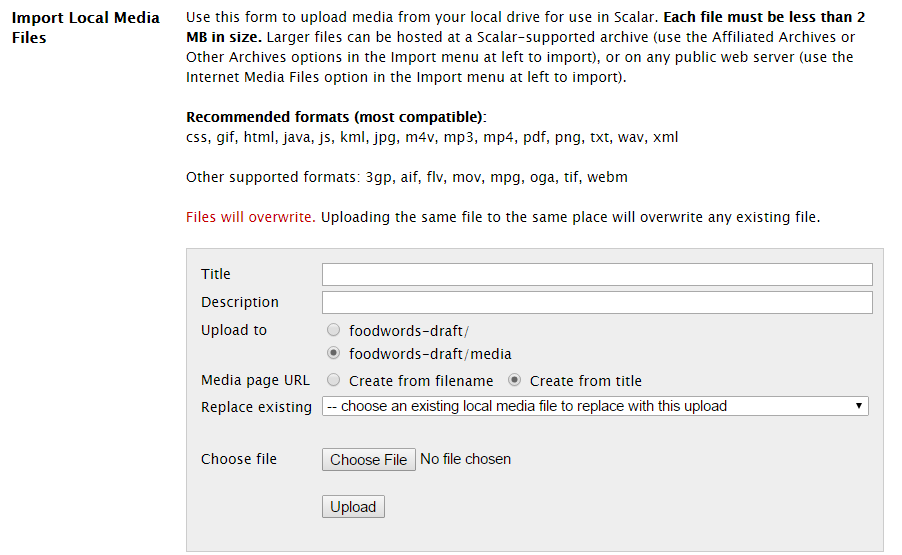
Local files are limited to 2mg in size. See image below for the guidelines.
Add a Title- This is what you will see in the index of pages and media
Add a description- This is for the background user or editor of the page, it will not show up to the public.
Add the URL or other information needed to link the media
There are additional options for making a piece of media a pathway, a comment, an annotation, a tag.
Add a tag by clicking next to “this page is tagged by the following tags” and select the appropriate tag(s).
Embed the knowledge source assessment. Instructions are on the Knowledge Source Assessment page.
Be the first to fill out the knowledge source assessment so others know why this is important to you.
Select “Save”
Editors: Add each page and media you add or create to the Scalar Central Tracking page of the Knowledge Source Assessment spreadsheet
If you are wanting to write comments specifically about the media page, you can either create an introductory page that is before the media page on the pathway OR you can create an annotation page that annotates the media page.
This is an example of the guideslines for uploading files:
This page has paths:
12017-01-11T12:30:40-08:00Monica Saralampi0bd9e2ff81f115ff7be276630d7287f8dd0c3b39How To Guide: Uploading Videos into YoutubeMonica Saralampi11this page details the steps for bringing videos from youtube into Scalar.plain2017-01-11T13:20:12-08:00Monica Saralampi0bd9e2ff81f115ff7be276630d7287f8dd0c3b39
1media/Yellow-Berries-sm.jpg2015-11-24T16:55:07-08:00Monica Saralampi0bd9e2ff81f115ff7be276630d7287f8dd0c3b39Technical Instructions on How to Add or Edit Modules/Pathways, Media, Pages, etc.Monica Saralampi4first page of the how to guide pathway of technical instructions on how to use the Scalar book to create pages, upload media and other resources, and pathways or learning modulesplain2017-01-11T13:29:36-08:00Monica Saralampi0bd9e2ff81f115ff7be276630d7287f8dd0c3b39