Scalar 2 User's Guide

Grid Visualization

Page

resourcerdf:resourcehttps://scalar.usc.edu/works/guide2/index-visualization
typerdf:typehttp://scalar.usc.edu/2012/01/scalar-ns#Composite
is livescalar:isLive1
was attributed toprov:wasAttributedTohttps://scalar.usc.edu/works/guide2/users/379
createddcterms:created2014-10-01T16:38:31-07:00

Version 11

resourcerdf:resourcehttps://scalar.usc.edu/works/guide2/index-visualization.11
versionnumberov:versionnumber11
titledcterms:titleGrid Visualization
descriptiondcterms:descriptionA book's content, displayed in a grid.
contentsioc:content

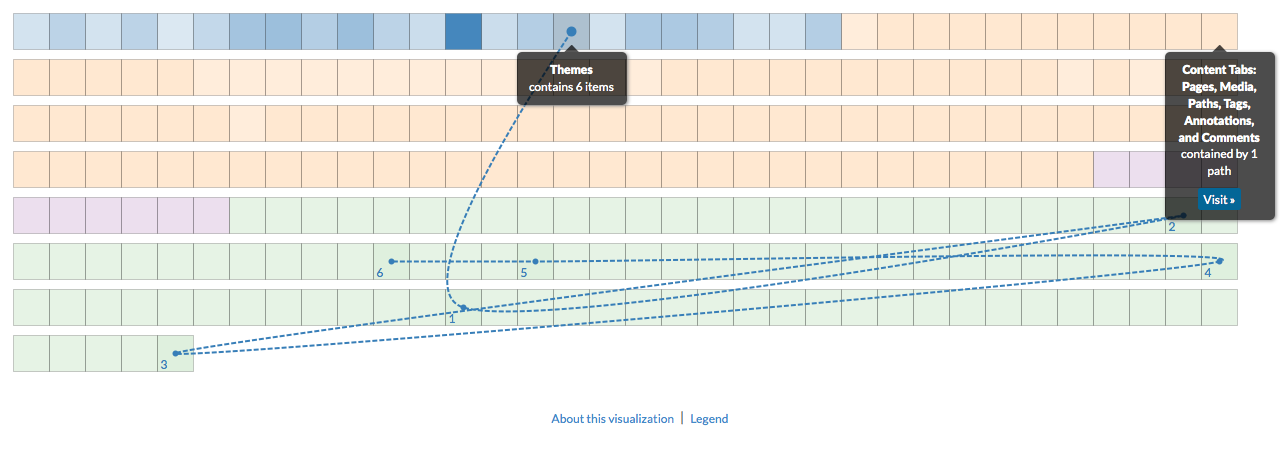
The grid visualization displays all content in the book in a grid format where each box represents a piece of content, color-coded by type. The darker the box, the more connections it has to other content (relative to the other boxes). Each line represents a connection, color-coded by type. You can roll over or click the boxes to browse connections, or click to add more content to the current selection, allowing multiple sets of relationships to be viewed simultaneously. To deselect a box, simply click it again.

Clicking an item's "View" button opens the associated content (page or media file).

default viewscalar:defaultViewplain
was attributed toprov:wasAttributedTohttps://scalar.usc.edu/works/guide2/users/913
createddcterms:created2016-10-17T09:07:41-07:00
typerdf:typehttp://scalar.usc.edu/2012/01/scalar-ns#Version

This page has paths:

  1. Global Visualizations Erik Loyer

This page references: