New Focus on Media
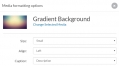
Authors now have the following choices when adding individual media objects to a page.
Authors can choose the size of the object to be displayed. Choices include “Small” (206px wide), “Medium” (412px wide), “Large” (620px wide), “Full” (maximum wide of the page), and “Native” (the original size of the media up to the maximum width of the page).
They can choose how they want the media object aligned on the page. Choices include "Left" (aligned left), "Center" (aligned center), and "Right" (aligned right).
Finally, authors can dictate what they'd like to appear in the caption just below the media object. Choices include "Description" (only the description for the media object will be displayed), "Title" (only the title of the media object will be displayed), "Title and description" (the title and description for the media object will be displayed), and "None" (neither title nor description will be displayed).
Details and Citations View
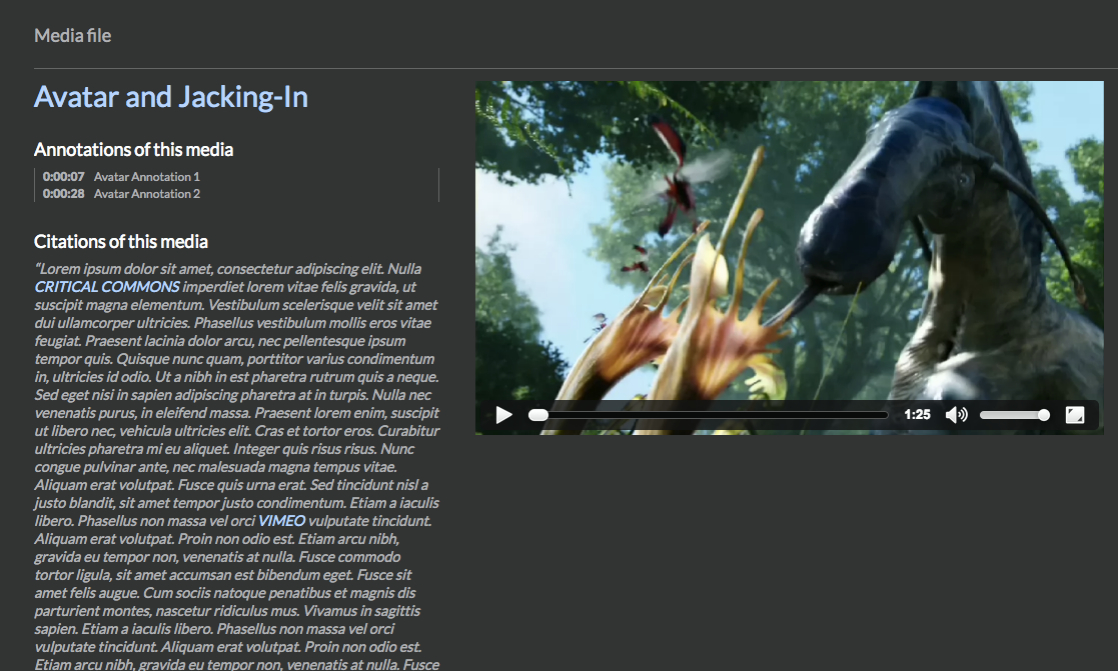
Scalar 2.0 was engineered to better foreground information about media objects and their use. Rolling over media now reveals, for readers, a series of options, among them, "Details," and "Citations." Clicking on "Details" reveals a subset of metadata associated with the object, and from there, access to all metadata for the object in RDF-XML, RDF-JSON, or HTML. Clicking on "Citations," opens an expanded view of media. This "Citations view," acts as kind of contextual hub for individual media objects, gathering up and revealing all uses to which it has been put throughout the book. All annotations made to the media can be accessed from within the "Citations view." All uses, or citations, of the media object, along with the full paragraph in which the media is cited are also listed. If the details view gives readers a fuller sense of the metadata record associated with a given media object (often imported directly from a curatorial context) the "Citations view" gives readers the fullest sense of how that media object is then put to use by the author or authors of a Scalar project.
This page has paths:
- Scalar 2.0: What’s New? Erik Loyer