New Ways to Navigate in Scalar 2.0
See where you are in the book
2) global visualization options
3) More robust index – in own box instead of sidebar
New Header Navigation
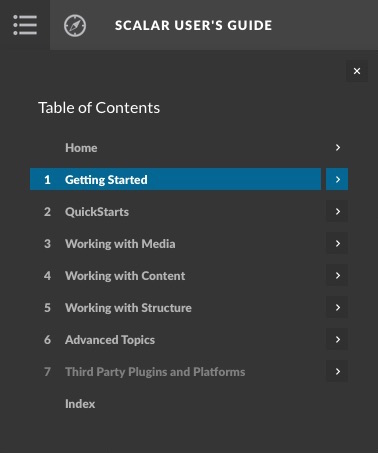
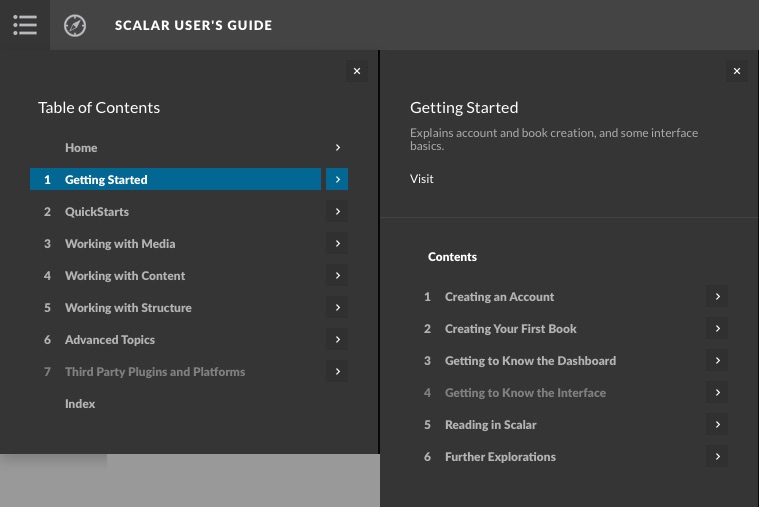
The new interface allows readers to explore the overall contents of a book without ever leaving the page! Unlike the old interface where the main menu is comprised of standard hyperlinks, in Scalar 2.0, the header incorporates an interactive menu allowing users to reveal the contents of top-level paths and any existing sub-paths. At the top-left of the header bar, you'll find a series of navigation icons. Rolling over the menu icon  reveals the book's main menu, which, like the old interface, acts as a kind of table of contents for the book (and, just as with Scalar 1.0, authors must add content to this main menu for it to appear). Clicking on the title of a page within the main menu will navigate the reader to that page. Additionally, clicking on the arrow
  just to the right of a page title will reveal the information tab for that page. If a page in the menu is also a path, its information tab will contain a submenu listing the pages in that path. Thus, by revealing the paths contained within main menu items, and (if they exist) sub-paths within those paths, the main menu gives readers an interactive, global view of a book's path structure.
This page has paths:
- Scalar 2.0: What's New? Curtis Fletcher