In longer texts like novels, plays, or long essays, readers benefit from having a table of contents that links to each chapter, act, or section of the text. Follow these steps to create a table of contents and link each section to the appropriate location within the text:
1. Place your cursor directly after the title/author/publication text at the beginning of your document and hit CTRL + Enter to create a new div and p (paragraph) element.
2. Type “Contents” in the p element within the new div element. Hit Enter on your keyboard to create another p element.
3. Drag and drop a list element from the Element Palette onto the p element. This will automatically create an item element inside the list element.
4. Type the names of the sections into the list items. Hit Enter on your keyboard to create a new item in the list.
5. To link the section names (e.g., “Chapter 1”) to the corresponding location in the text, you must assign an ID to each section heading:
a. Click the p element containing the section heading, click Assign ID, and enter an ID in the xml:id field. The standard ID naming convention is “c-1” for Chapter 1, “c-2” for Chapter 2, and so on.
b. Click the checkmark icon to save the ID. 6. Repeat steps 5a and 5b for all sections of the text.
7. Scroll back up to the table of contents you created in steps 1-4. Use your cursor to highlight the name of a chapter in the table of contents list.
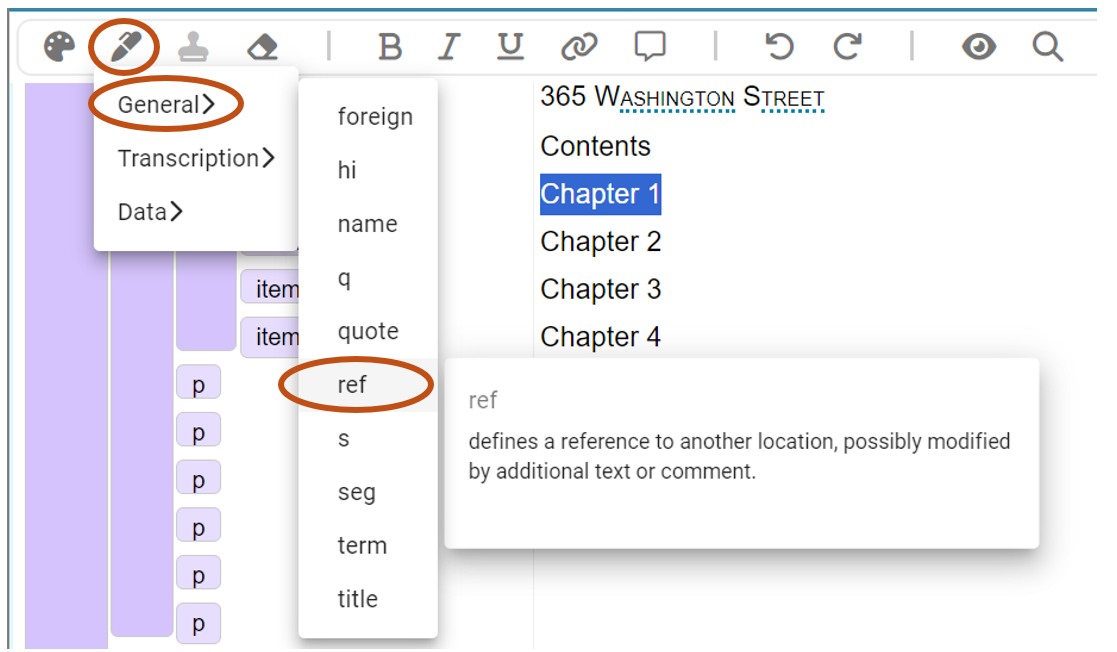
8. Click the Mark Phrase icon (to the right of the Element Palette icon). In the dropdown menu select General, then ref.
9. Now that you’ve added a ref tag to the chapter name, the chapter name will appear underlined with a dotted line. Click the underlined text to open the Element Inspector.
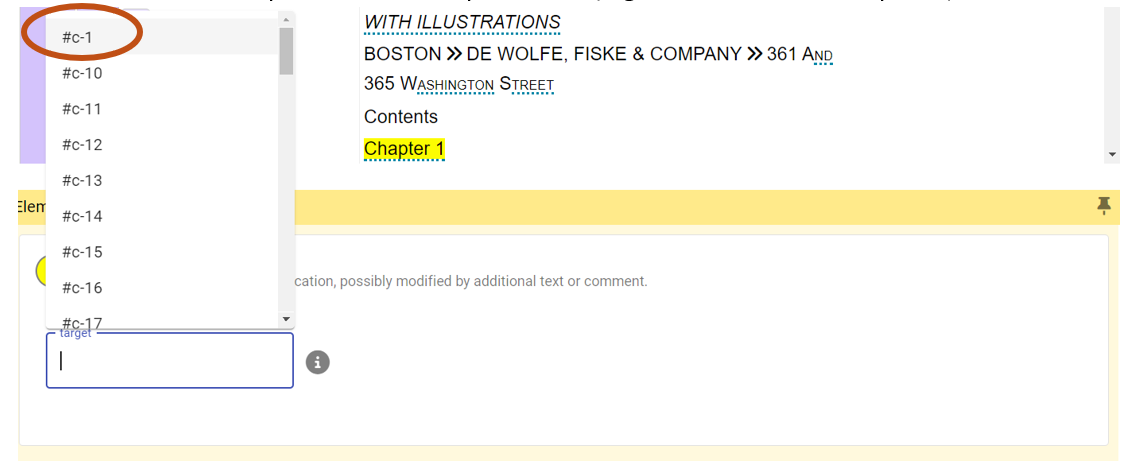
10. Click the target field to open a menu of all IDs used within the document. Select the ID that corresponds to the chapter name (e.g., select #c-1 for Chapter 1).
11. Repeat steps 8-10 for all chapter names in the table of contents.
12. Click the Preview icon to test your table of contents links.
This page has paths:
-
1
2024-11-03T12:03:06-08:00
Monica Wolfe
258808f5fb9e497e04f66e6176400bcc2422e128
Text Encoding Index
Monica Wolfe
5
visual_path
1559513
2024-11-03T12:22:30-08:00
Monica Wolfe
258808f5fb9e497e04f66e6176400bcc2422e128
This page references:
-
1
media/ToC4 Ref Elements for Table of Contents_thumb.png
2024-11-03T14:04:04-08:00
ToC4 Ref Elements for Table of Contents
1
media/ToC4 Ref Elements for Table of Contents.png
plain
2024-11-03T14:04:05-08:00
-
1
media/ToC5 Select Target Field for Ref_thumb.png
2024-11-03T14:04:33-08:00
ToC5 Select Target Field for Ref Element
1
media/ToC5 Select Target Field for Ref.png
plain
2024-11-03T14:04:34-08:00
-
1
media/ToC6 Preview Icon_thumb.png
2024-11-03T14:04:49-08:00
ToC6 Preview Icon
1
media/ToC6 Preview Icon.png
plain
2024-11-03T14:04:50-08:00
-
1
media/ToC1_thumb.png
2024-11-03T14:01:34-08:00
ToC1 Drag List Item from Element Palette
1
media/ToC1.png
plain
2024-11-03T14:01:35-08:00
-
1
media/ToC2 Table of Contents List Items_thumb.png
2024-11-03T14:01:56-08:00
ToC2 Table of Contents List Items
1
media/ToC2 Table of Contents List Items.png
plain
2024-11-03T14:01:56-08:00
-
1
media/ToC3 Assign IDs for Table of Contents_thumb.png
2024-11-03T14:02:18-08:00
ToC3 Assign IDs for Table of Contents
1
media/ToC3 Assign IDs for Table of Contents.png
plain
2024-11-03T14:02:18-08:00