Scalar's 'additional metadata' features have been disabled on this install. Learn more.
Scalar 2 User's GuideMain MenuGetting StartedExplains account and book creation, and some interface basics.QuickStartsA path of all QuickStart content in this user's guide.Working with MediaHow to get the most out of your use of media in Scalar.Working with ContentCreating and editing content in Scalar.Working with WidgetsWorking with StructureHow to use Scalar's many options for structuring publications.Editorial WorkflowHow to use features for performing editorial review of content.VisualizationsExploring the contents of a book visually.LensesAn introduction to lenses, a tool for searching and visualizing Scalar content.Advanced TopicsDescribing Scalar's more advanced features.Third Party Plugins and Platforms
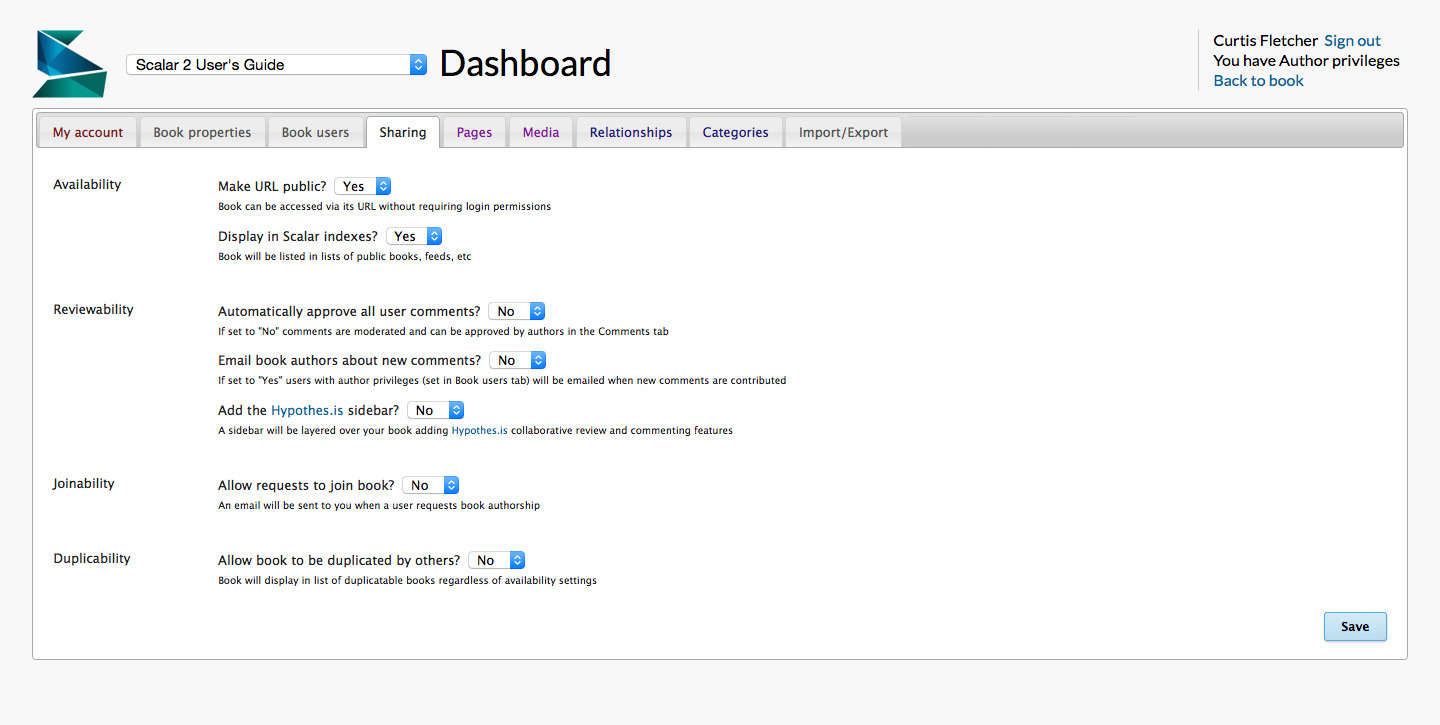
12014-10-01T16:38:34-07:00Sharing2plain2014-10-17T11:17:24-07:00The Dashboard's Sharing tab allows you to set parameters regarding the availability and duplicability of your book.
Availability. To make your book's URL accessible without a login (and thus crawlable by search engines), set "Make URL public?" to Yes. To make your book accessible in Scalar's Index page, set "Display in Scalar indexes?" to Yes.
Joinability. Setting joinability to "Yes" will allow other Scalar account holders to ask permission to become an author on your book. An email will be sent to you when a user requests book authorship.
Duplicability. Selecting "Yes" will allow you and others to duplicate your book in its entirety. To duplicate your book select "Yes" here and then go to the My account tab in your dashboard and locate "Duplicate a book" just under "Create new book."